


ENTERING SWIM MEETS via SE Motion App
Swim Meets can require some navigation to get your child entered into.
Our guide below will hopefully make the process a little smoother when entering your child for an "Open Meet" or for when they may be selected for a "League Gala"
League Galas are team events whereby the Hillingdon SC Coaching Team will pre-select a number of swimmers to compete for our club. These events see our swimmers race for team points as opposed to individual glory with selected swimmers racing in either individual or relay events. Being selected for a team event can be the highlight of a swimmers year and a great accolade to hold; even if it is just one swim which they are selected for.
If your child is selected for a League Gala it will be something similar to the M11 League or National Arena League. You will receive an email to notify you of your child's selection and this event will appear on the SE Motion app screen such as below. You will need to repond promptly to the coach organising the team if your swimmer is unable to attend.
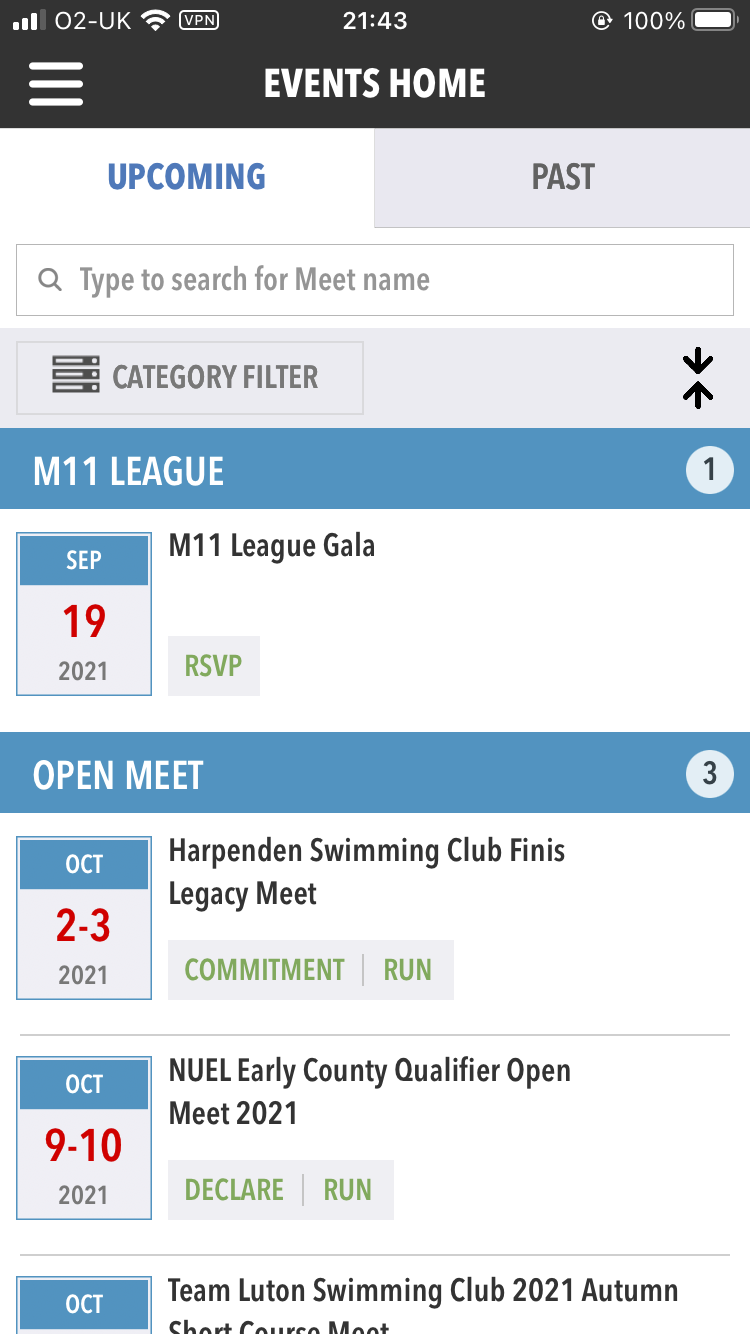
There are many Open Meets held throughout the swimming season which allow swimmers to race individual events at which they can gain licensed times and strive to achieve personal best swims. The Hillingdon SC Coaching Team manage a Competition Calendar which identifies meets appropriate for entry for each squad within our club. Swimmers are restricted to entering only the meets designated for their squad.
The steps below can help when entering your child into an Open Meet.
Firstly, select the meet via the SE Motion app;
For this guide we will be selecting the NUEL Early County Qualifier Open Meet 2021.
Pressing on this meet will open the following page;

This page will present you with the information for the meet;
- Start and End dates
- Start Times
- Address of the pool the meet will take place at
- Events being raced
- Cost of entry per event
- Other information as required
To check your child's entries you must press the "DECLARE" button to bring you to the following page (Do NOT select RUN);
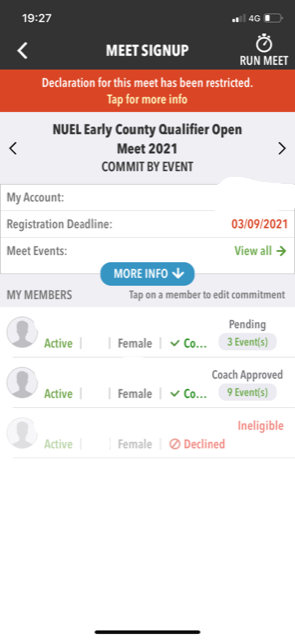
The page above will list all club members that are registered to your account. In the above example 2 of the 3 swimmers are eligible for entry into the selected meet. By pressing one of the eligible swimmers we are brought into the next page;
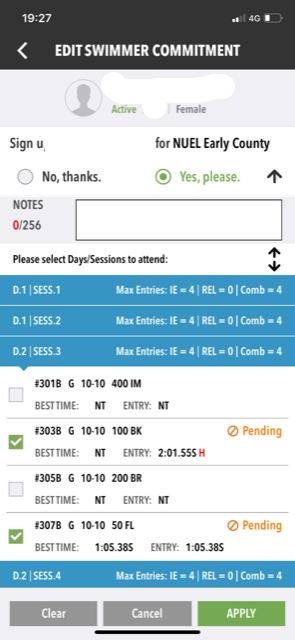
On the above page you are presented with each session that takes place during the gala (generally there are 2-3 sessions per day with 3-4 events available per gender in each session). By clicking on each session (the blue ribbon) it will expand to show the available events for your child. For quite a few meets during the season, the coaches will provide a list of suggested entries for your child. At other meets the entry may be left up to the swimmer to choose. Choices can be made by pressing the box beside each event so that a green tick box shows (meaning the swimmer will be entering this event).
Click on "APPLY" when you have completed your selection of events for your swimmer.
Follow the same process above if you have more than one swimmer eligible to attend the meet.
Please note that for many events there are set Qualifying Times that need to be achieved in order to enter. These meets will restrict your swimmer to just the events they have previously raced, provided that their time is fast enough. This is why the clubs Competition Calendar targets certain meets for specific squads.
The examples above show the option of completing gala entry via the SE Motion app. Gala entry can also be completed by logging in on a computer/laptop via the club website and the by following the same selection procedures.




© 2020 Hillingdon Swimming Club
